

19.11.2017 13:00Leolo wrote: Hi,
If you play with Fast travel mod, check on Nexus for the special patch. It will solve the map issue if your problem come from this mod.
Leolo
I will check it out.
apparently many mods that add markers to the map, will not work. there is slowly coming a time where many old mods will not work, as the game is updated, over and over. some of the mods are like nearly three years old.
what will happen with that DLC? will it require a new game?!
freestone

19.11.2017 13:39Freestonew wrote: what will happen with that DLC? will it require a new game?!
freestone
Will old saves be compatible with "Forgotten Stories" or will I have to start a new game?
Generally speaking, Forgotten Stories will be compatible with old save-games. However, we advise starting a new play-through, particularly for those players desiring to unlock the hidden ending. Forgotten Stories is designed and balanced so that it fits and enhances the main game rather than as a stand-alone.

Not sure about this, but guess you can fix that display problem by creating a mod which edits the Enderal worldspace after the patch 1.2.4.0 and set this mod last in the games load order.
hi....
it was said...
"Generally speaking, Forgotten Stories will be compatible with old save-games. However, we advise starting a new play-through, particularly for those players desiring to unlock the hidden ending. Forgotten Stories is designed and balanced so that it fits and enhances the main game rather than as a stand-alone.".
I feel happy but at the same time my old bugaboo surfaces. I rarely get very far in modded games as a new wonderful mod comes out and the readme says, "one should really begin a new game for this mod". then I begin again. then another mod comes out......
I realize that this question has a slight rudeness to it but I will have to ask anyway!
when is the DLC forgotten stores coming out? I would like to know as I hope then perhaps to play the game.
I wonder if many of the mods will also have to be updated.
thanks...freestone
it was said...
"Generally speaking, Forgotten Stories will be compatible with old save-games. However, we advise starting a new play-through, particularly for those players desiring to unlock the hidden ending. Forgotten Stories is designed and balanced so that it fits and enhances the main game rather than as a stand-alone.".
I feel happy but at the same time my old bugaboo surfaces. I rarely get very far in modded games as a new wonderful mod comes out and the readme says, "one should really begin a new game for this mod". then I begin again. then another mod comes out......
I realize that this question has a slight rudeness to it but I will have to ask anyway!
when is the DLC forgotten stores coming out? I would like to know as I hope then perhaps to play the game.
I wonder if many of the mods will also have to be updated.
thanks...freestone
I had a problem after 1.2.4.1 A65 map only showed icons, no paper map. After downloading the Launcher again, I checked the skyrim.ini file as instructed. There was one slight difference, my file had the "uLockedObject..." and "uLockedTerrain..." at the bottom under [VATS]. I moved those 2 files under [MAPMENU] and now I can see the paper map. Just in case this might help someone else with the same problem.
13.11.2017 16:57Hoxyd wrote: Maybe your Launcher was not updated, close your game and re-download the Enderal Launcher from http://enderal.com (the Launcher that introduced the map is A65). Start the launcher and check if the ini was updated. Enderal Launcher > Settings > Others > Skyrim.ini
Should look like this:
Also if you use mods like fast travel in Enderal, deactivate them.Code Select alluLockedObjectMapLOD=32 uLockedTerrainLOD=32 sWorldMapOverlayNormalSnowTexture sWorldMapOverlayNormalTexture fWorldMapDepthBlurScale=0.0000 fMapWorldMaxPanSpeed=80000.0000 fMapWorldCursorMoveArea=0.4000 fMapWorldYawRange=20.0000 fMapWorldMinPitch=90.0000 fMapWorldMaxPitch=90.0000

04.01.2018 14:15Vadim wrote:Thanks.03.01.2018 19:33Hoxyd wrote: The Russian version is now updated.
I apdated louncher then disable Fast Travel and map is working good.
But how to use Fast Travel mod now?
it was updated for the latest patch.
(don't know if it works though, never used fast travel)
otherwise you'll need to contact the mods creator and request an update.
or, you know.
don't use it

04.01.2018 15:09urst wrote:this one?04.01.2018 14:15Vadim wrote:Thanks.03.01.2018 19:33Hoxyd wrote: The Russian version is now updated.
I apdated louncher then disable Fast Travel and map is working good.
But how to use Fast Travel mod now?
it was updated for the latest patch.
(don't know if it works though, never used fast travel)
otherwise you'll need to contact the mods creator and request an update.
or, you know.
don't use it
Really thank you. Unfortunatly I used other Fast Travel mod.
I know that using Fast Travel mod looks like a cheating but I have too less time for gaming and I use fast travel mod only for having more time for awesome quests
04.01.2018 16:09Vadim wrote: I know that using Fast Travel mod looks like a cheating but I have too less time for gaming and I use fast travel mod only for having more time for awesome quests
In some places Fast Travel can destroy a quest!
When you have to reach a certain place at a certain time.

Let me Thank all those involved in the Enderal addition to Skyrim, I played through it several times last winter, loved the storyline, just awesome - I am semi retired I play in the winter months here in the northeast.
Last season the regular map worked fine, I used a fast travel mod as well with Enderal again it was fine. This winter I tried to play Enderal and the map was similar to one posted above, it also messed up my regular skyrim 32bit games world map as well. The only fix I found for Skyrim was to do a fresh install of Windows 10 and a fresh install of Skyrim 32bit.
I would love to play Enderal again this winter, I am concerned the world map will not be fixed & also the install of Enderal may mess up my Skyrim world map.
Has any of the map issues been fixed? the .ini file fixes I had never seen to verify they would indeed fix my skyrim world map.
Any information greatly appreciated, I may ghost my disk & do a Enderal install to verify the map issue / fix.
Again Thank you for an awesome game
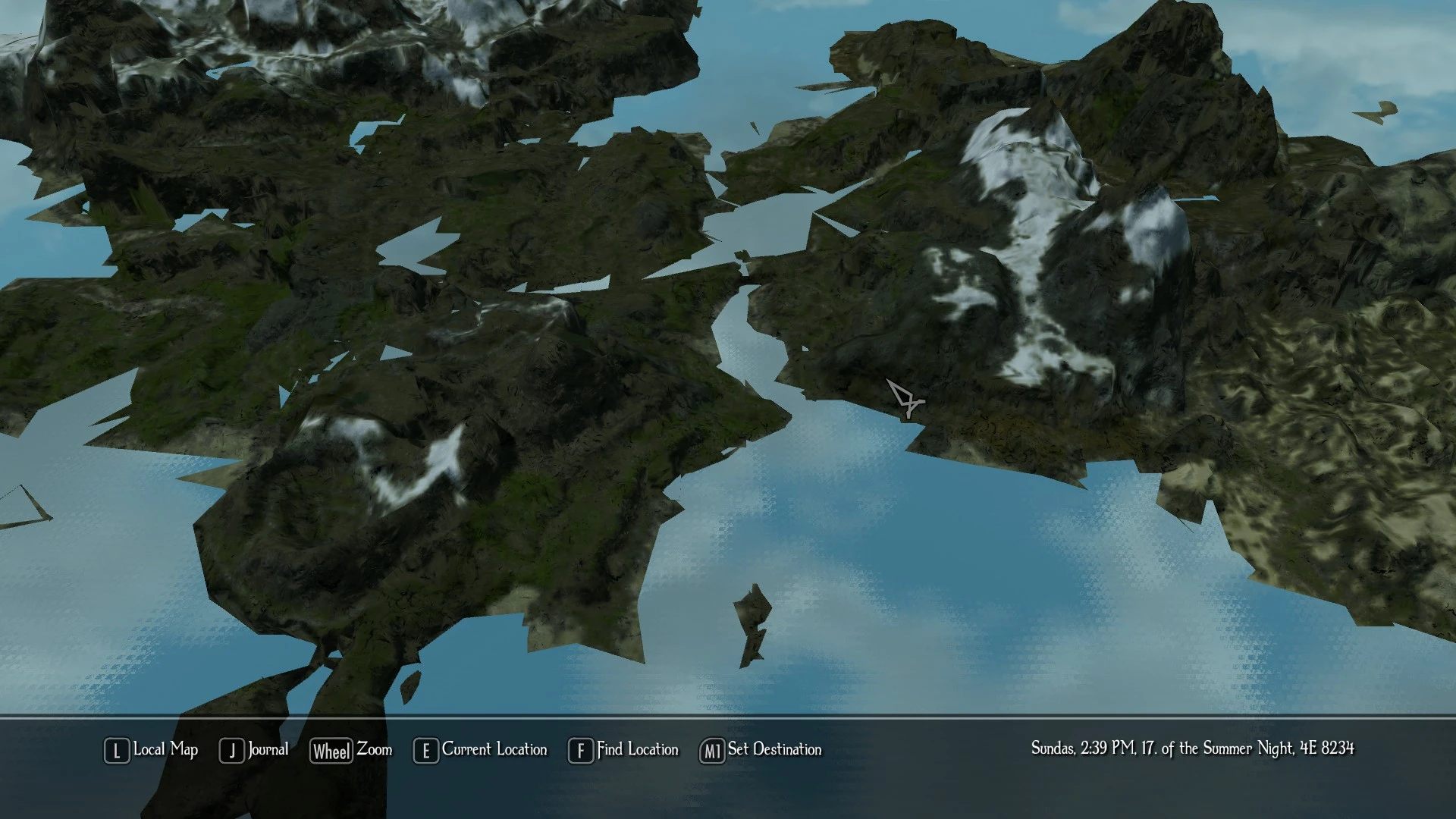
Last season the regular map worked fine, I used a fast travel mod as well with Enderal again it was fine. This winter I tried to play Enderal and the map was similar to one posted above, it also messed up my regular skyrim 32bit games world map as well. The only fix I found for Skyrim was to do a fresh install of Windows 10 and a fresh install of Skyrim 32bit.
I would love to play Enderal again this winter, I am concerned the world map will not be fixed & also the install of Enderal may mess up my Skyrim world map.
Has any of the map issues been fixed? the .ini file fixes I had never seen to verify they would indeed fix my skyrim world map.
Any information greatly appreciated, I may ghost my disk & do a Enderal install to verify the map issue / fix.
Again Thank you for an awesome game
welcome to the forum 
did you read the first post?
this issue isn't "more fixable", it's caused either by an outdated launcher / missing ini - lines
or by mods, Fast Travel being one of them (that was patched though, look two post above yours ).
did you read the first post?
this issue isn't "more fixable", it's caused either by an outdated launcher / missing ini - lines
or by mods, Fast Travel being one of them (that was patched though, look two post above yours
).
Hello,
Enderal map seems to break with certain house mods.
https://www.nexusmods.com/skyrim/mods/7 ... escription
en
https://www.nexusmods.com/skyrim/mods/78680
the last one is taken down for now but still doesn't work with map.
Enderal map seems to break with certain house mods.
https://www.nexusmods.com/skyrim/mods/7 ... escription
en
https://www.nexusmods.com/skyrim/mods/78680
the last one is taken down for now but still doesn't work with map.
17.01.2018 22:42Ikkegwn wrote: Hello,
Enderal map seems to break with certain house mods.
https://www.nexusmods.com/skyrim/mods/7 ... escription
en
https://www.nexusmods.com/skyrim/mods/78680
the last one is taken down for now but still doesn't work with map.
welcome to the forum
the map isn't compatible with any mod that adds markers and is not yet updated.
(as stated here)
that can't be changed - the mods need to get patched for the newer version,
or you just can't use them
All Feb left - going to install another disc load win10 and a fresh install of Skyrim / Enderal see if the ini file needs attention on my end.
Thanks again & I will post regardless of the outcome.
Thanks again & I will post regardless of the outcome.
The newer map looks great & works well - I used the fast travel mod it too works fine with the map
stuck on the "Calia stuck on "Angel" Quest" now hoping to get past that bug
stuck on the "Calia stuck on "Angel" Quest" now hoping to get past that bug
So I'm having a similar problem.
New player, just heard about Enderal a couple of days ago. Had some trouble getting it updated but found some recommended tricks and it finally was playable. Ran it for an hour or so before I even looked at the map and it was blank. Landmarks visible but no texture visible, just blank-blue.
My updater is A65. NO mods installed, just the SKSE that it seemed to want. I tried starting a new game but that didn't change anything.
I found another thread that suggested editing your Skyrim.ini to insert missing mapmenu entries so I did that but it actually led to the game crashing so I've deleted it entirely to allow it to be recreated....but it didn't so I restored it from backup.
Here's my skyrim.ini lines:
New player, just heard about Enderal a couple of days ago. Had some trouble getting it updated but found some recommended tricks and it finally was playable. Ran it for an hour or so before I even looked at the map and it was blank. Landmarks visible but no texture visible, just blank-blue.
My updater is A65. NO mods installed, just the SKSE that it seemed to want. I tried starting a new game but that didn't change anything.
I found another thread that suggested editing your Skyrim.ini to insert missing mapmenu entries so I did that but it actually led to the game crashing so I've deleted it entirely to allow it to be recreated....but it didn't so I restored it from backup.
Here's my skyrim.ini lines:
[MapMenu]
uLockedObjectMapLOD=32
uLockedTerrainLOD=32
sWorldMapOverlayNormalSnowTexture
sWorldMapOverlayNormalTexture
fWorldMapDepthBlurScale=0.0000
fMapWorldMaxPanSpeed=80000.0000
fMapWorldCursorMoveArea=0.4000
fMapWorldYawRange=20.0000
fMapWorldMinPitch=90.0000
fMapWorldMaxPitch=90.0000
sMapCloudNIF=0
welcome to the forum
skse is already included 
so there's either something else wrong with your installation or you tried installing on Skyrim SE.
(which won't work)
14.04.2018 18:46George_Spelvin wrote: My updater is A65. NO mods installed, just the SKSE that it seemed to want.
so there's either something else wrong with your installation or you tried installing on Skyrim SE.
(which won't work)
Profile - Freestonew

Profile - Kermit 61

"Meine Gefühle für Elfenwurzeln sind streng geheim, Späherin Harding!"
Profile - Hoxyd
Profile - Freestonew
Profile - badgesareus

Profile - Vadim

Profile - Hoxyd
Profile - Vadim
Profile - Vadim
Profile - Kermit 61
"Meine Gefühle für Elfenwurzeln sind streng geheim, Späherin Harding!"
Profile - tazz001

Profile - Ikkegwn

Profile - Ikkegwn
Profile - tazz001
Profile - tazz001
Profile - George_Spelvin