

When I click the Torrent (NOW!) button it just directs me to the torrenten.enderal page and no download is starts. Sorry for the stupid question but... how do I get it to start?
EDIT: Fellow members linked the torrent and the launcher in the comments below. Thank you!
EDIT: Fellow members linked the torrent and the launcher in the comments below. Thank you!
Last edited by Ripol on 16.08.2016 14:23, edited 1 time in total.

Do you have torrent software installed? Only the torrent file is stored at the Enderal page. You need to download the torrent file from there and load it into torrent software to download the actual installation package.
J'Sylvan wrote:Do you have torrent software installed? Only the torrent file is stored at the Enderal page. You need to download the torrent file from there and load it into torrent software to download the actual installation package.

Ripol wrote:I have a torrent software (uTorrent), and where is the torrent stored? I can't find it anywhere... could you please send a link here? I only saw this page: http://torrenten.enderal.com/J'Sylvan wrote:Do you have torrent software installed? Only the torrent file is stored at the Enderal page. You need to download the torrent file from there and load it into torrent software to download the actual installation package.
Could you explain yourself ? Because I have the same problem, but I dont know how to use the "open with" in a link with Google Chrome
Thanks
Thanks
paulus_romanus wrote:Could you explain yourself ? Because I have the same problem, but I dont know how to use the "open with" in a link with Google Chrome
Thanks
When I run my torrent software, I can chose file- add new torrent link. A window appears where I can enter the link http://torrenten.enderal.com/
Maybe you could try this.
I copied the link and opened with bittorrent , but it have an error and said something about an exepected value in becoded string
Or try saving (allow your browser to download the file) the torrent file (few bytes) then open whatever torrent client you are using (qbittorrent is very good, but any will work) and in the menu the torrent client will have "Add Torrent" click that and then navigate to where your browser downloads all your downloads to and select the torrent file.
paulus_romanus wrote:I copied the link and opened with bittorrent , but it have an error and said something about an exepected value in becoded string
Jaknet wrote:This is probably because bittorrent is expecting a torrent file and not a link, but not sure as haven't used bittorrent for many yearspaulus_romanus wrote:I copied the link and opened with bittorrent , but it have an error and said something about an exepected value in becoded string
But I then tried in Vuze, and the error is that "the file is not a .torrent"
paulus_romanus wrote:The thing is that I used the "add URL" option.
Sorry not more help

Just checked clicking the link provided by Xagul and it downloads the .torrent file and my torrent software qbittorrent automatically started.
I've attached the actual .torrent file, try download this and then starting the torrent from your client
I've attached the actual .torrent file, try download this and then starting the torrent from your client
Attachments
EnderalInstall_EN.torrent
(20.22 KiB) Downloaded 166 times
Jaknet wrote:Then I'm not sure, maybe try downloading just the torrent file as it's very small and then add torrent that way via your torrent client.paulus_romanus wrote:The thing is that I used the "add URL" option.
Sorry not more help
Last edited by paulus_romanus on 15.08.2016 22:10, edited 2 times in total.
paulus_romanus wrote:But that is my problem , because when I go to http://dl.enderal.com/ if I use the torrent option it redirect me to http://torrenten.enderal.com/Jaknet wrote:Then I'm not sure, maybe try downloading just the torrent file as it's very small and then add torrent that way via your torrent client.paulus_romanus wrote:The thing is that I used the "add URL" option.
Sorry not more help
Thanks, but could you do the same with the launcher? becuase it redirects me http://launcheren.enderal.com/
paulus_romanus wrote:
I did not saw your reply!!!
Thanks, but could you do the same with the launcher, becuase it redirects me http://launcheren.enderal.com/
Attachments
Enderal Launcher.zip
(2.57 MiB) Downloaded 159 times
Jaknet wrote:I really hope this allowed and as the forum will not allow .exe due to the risk I've zipped it...so extract and run after the .torrent has finished downloading and you have put both in your skyrim folderpaulus_romanus wrote:
I did not saw your reply!!!
Thanks, but could you do the same with the launcher, becuase it redirects me http://launcheren.enderal.com/
A thousand thanks
@paulus_romanus I suspect there is a setting with your browser that isn't allowing downloads as both these links automatically download the required files.
But if this is working, that's the important thing for the moment... Hope it all works and enjoy
But if this is working, that's the important thing for the moment... Hope it all works and enjoy
paulus_romanus wrote:
Man! You saved my day!
A thousand thanks

Enjoy the game and just remember to stick the launcher (extracted) in the skyrim foler and the data from the .torrent (don't extract it) in the same skyrim folder before running the launcher and if it asks you where the .gz file is just browse to the same skyrim folder.
Good luck
@paulus_romanus as requested via pm (no attachments allowed in pm) a new download and zipped (using 7zip saved as basic .zip and tested ok) of the enderal launcher.exe
Fingers crossed and good luck
Edit... to test I've just downloaded and run this from inside the zip and this is the message you'll get if you forget to move it to your skyrim folder as seen in the image.
Quick question, do you have your Skyrim in the Steam folders ?
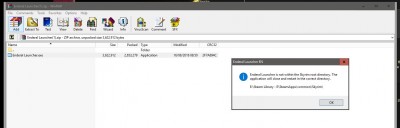 Edit 2.... does Skyrim launch from Steam happily, as I don't know but might be worth checking that it's working as if that's not running it could be why the launcher fails as (I believe) it checks that it's in the same folder as Skyrim with some method that muight require a Skyrim that has run at least once to register it's location in the regisrty... this is just pure guesswork, but double check that your Skyrim is working if this launcher isn't working for you
Fingers crossed and good luck
Edit... to test I've just downloaded and run this from inside the zip and this is the message you'll get if you forget to move it to your skyrim folder as seen in the image.
Quick question, do you have your Skyrim in the Steam folders ?
Image of the downloaded file from this post working
Profile - Ripol


Profile - Ripol
Profile - Xagul

Rank: Schattengott
Posts: 859
Joined: 30.06.2007 17:57
Location: München, die unfassbare und "wunderschöne" "Isarmetropole"
Hoffentlich kommen die neuen Rüben bald!
Profile - paulus_romanus

Profile - Xagul
Rank: Schattengott
Posts: 859
Joined: 30.06.2007 17:57
Location: München, die unfassbare und "wunderschöne" "Isarmetropole"
Hoffentlich kommen die neuen Rüben bald!
Profile - paulus_romanus
Profile - Jaknet

Profile - Jaknet
Profile - paulus_romanus
Profile - Jaknet
Profile - Jaknet
Profile - paulus_romanus
Profile - Jaknet
Profile - paulus_romanus
Profile - Jaknet
Profile - paulus_romanus
Profile - Jaknet
Profile - Jaknet
Profile - Jaknet