

Hello guys, I'm ahving some issues again at ark, i already tried to disable mods and didn't work. It's weird because i had being accessing to this aprt of Ark without problem until now that i have to get there for a mission
Attachments
Saves.7z
I leave here my saves
(1.34 MiB) Downloaded 71 times

your save runs completely fine on my end 
(which is actually a good thing, the bug is not stuck to your save)
please delete the two *.ini files from (...\Documents\My Games\Enderal) and let Steam recreate them (with a file verification).
if that doesn't help you might want to think about a clean reinstall, at least a first without mods.
I assume there a some leftover files of your mods that didn't get deleted correctly.
don't know why, or which of them would influence the cell changes.
(which is actually a good thing, the bug is not stuck to your save)
please delete the two *.ini files from (...\Documents\My Games\Enderal) and let Steam recreate them (with a file verification).
if that doesn't help you might want to think about a clean reinstall, at least a first without mods.
I assume there a some leftover files of your mods that didn't get deleted correctly.
don't know why, or which of them would influence the cell changes.
Ok so i deleted the .ini files, but when i tell steam to verify he doesn't download them, it says everything is fine.
Also the problem keeps happening sadly.
Also the problem keeps happening sadly.
Ok so i deleted all files from: my games/enderal except for saves of course, now deleting also the Enderal text file and Enderalprefs i made steam download them, i don't know if that's suppoused to be usefull... I also disabled all mods and still happens, is there no way to solve this without reinstalling guys?
sorry, my bad, it's still the launcher that recreates these files 
so maybe close the launcher and restart it after deleting them.
otherwise
uninstall your mods. (it's not the same as deactivating, the interfering files are still there.)
verify your files after that.
if that still doesn't work reinstall the game.
(or do that first, you decide which is faster )
)
EDIT
to make sure, are we talking about an actual Crash To Desktop?
or does the game stop responding? do you get any error message?
and does that happen just at the Southern Quarter (no matter how you try to enter)?
so maybe close the launcher and restart it after deleting them.
otherwise
uninstall your mods. (it's not the same as deactivating, the interfering files are still there.)
verify your files after that.
if that still doesn't work reinstall the game.
(or do that first, you decide which is faster
)EDIT
to make sure, are we talking about an actual Crash To Desktop?
or does the game stop responding? do you get any error message?
and does that happen just at the Southern Quarter (no matter how you try to enter)?
Ok i reinstalled the game and the issue is still there
06.07.2019 21:58urst wrote: sorry, my bad, it's still the launcher that recreates these files
so maybe close the launcher and restart it after deleting them.
otherwise
uninstall your mods. (it's not the same as deactivating, the interfering files are still there.)
verify your files after that.
if that still doesn't work reinstall the game.
(or do that first, you decide which is faster
EDIT
to make sure, are we talking about an actual Crash To Desktop?
or does the game stop responding? do you get any error message?
and does that happen just at the Southern Quarter (no matter how you try to enter)?
Well i uninstalled them but it didn't work
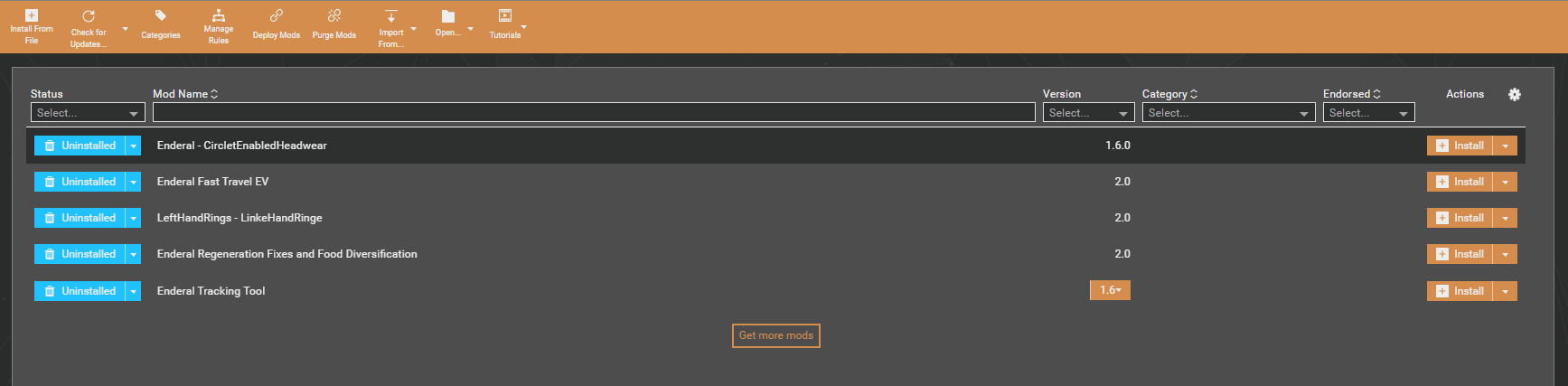 I guess you meaned this
I guess you meaned thisProfile - Havajos


Profile - Havajos
Profile - Havajos
Profile - Havajos
Profile - Havajos
Profile - Havajos