

Hey guys,
some of you may have noticed that we will include the in-game Paper World Map in the 1.2.4.0 patch into Enderal.
Here are some information and hints regarding the map:
Have a nice day / evening / night
some of you may have noticed that we will include the in-game Paper World Map in the 1.2.4.0 patch into Enderal.
Here are some information and hints regarding the map:
- The 2D Paper World Map will replace the 3D World Map completely. Due to various technical difficulties, it is not prossible to provide the current 3D World Map as alternative to download.
- The new map will also be compatible with old saves.
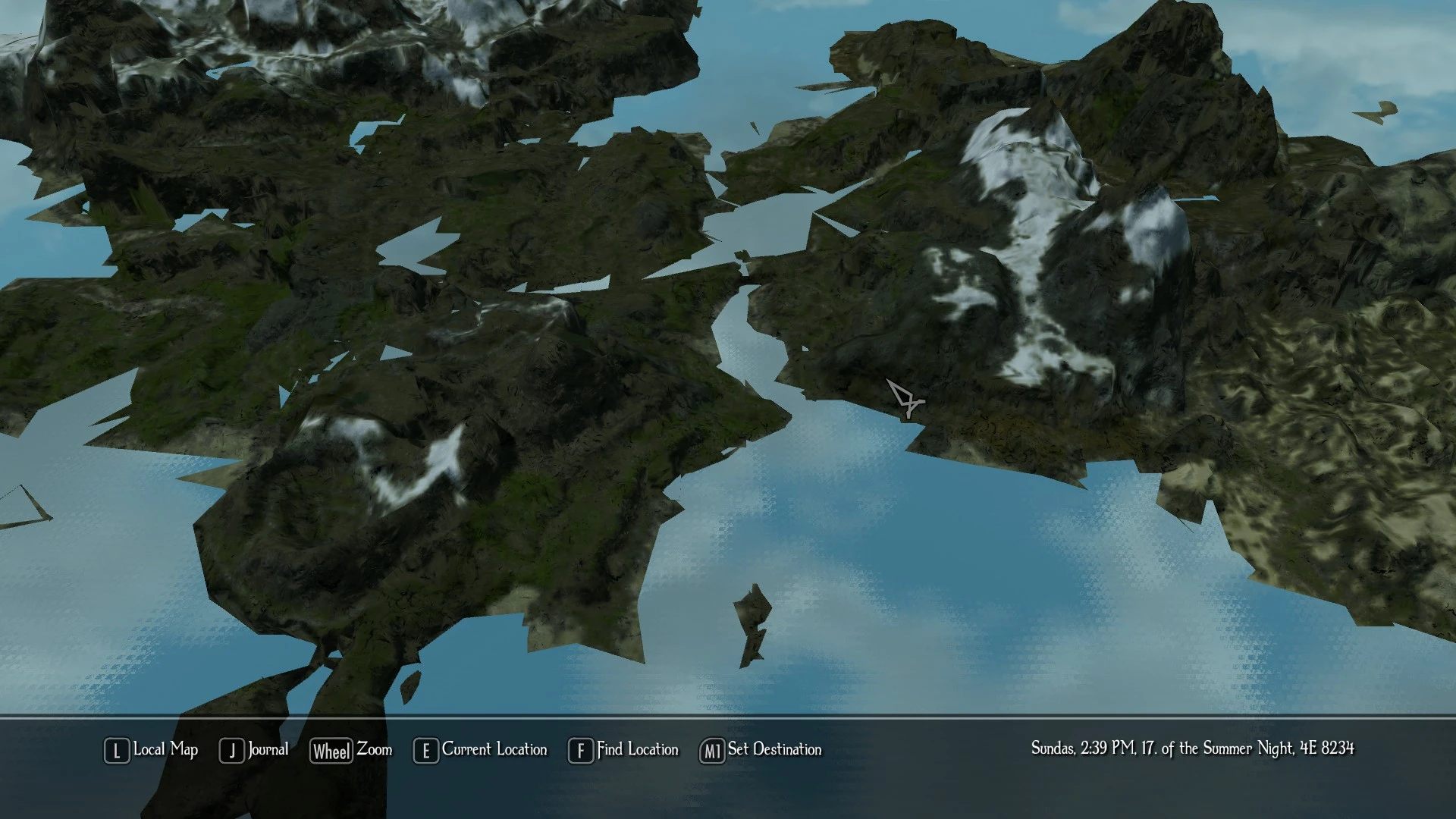
- This update changes various important files, including the Skyrim.ini. If you can only see a bad version of the 3D Worldspace after the Update, then check your Skyrim.ini (located in C:\User\*Username*\Documents\mygames\skyrim\ or in the Enderal Launcher > Settings > Others) for the following lines: If you can't find them, your Enderal Launcher or .ini wasn't updated properly. The newest version of the launcher is A65 (the version number can be found in the upper left corner of the Enderal Launcher). Make sure to donwload the Enderal Launcher from our website and copy it over into your Skyrim directory. After that, copy and paste the lines written above into the Skyrim.ini, save it and restart Enderal via the Enderal Launcher.
- If you load up additional mods with Enderal, it might very well be that they can break the new Paper World Map. Especially if these mods change something in the Worldspaces. Please deactivate your mods one by one to find out which one is causing the trouble. Please contact the respective mod author and ask for an adjustment for the latest patch.
- To get the player position marker working properly, you will need to enter the huge Enderal Worldspace once.
- Sadly it is not possible to set an own destination with the new worldmap anymore. If we find a way to include this feature, we will do so.
- The quality of the Paper Map depends on the Textur Quality setting in the Enderal Launcher.
Have a nice day / evening / night

I'm curious as to the reason why the replacement. Was there something inherently wrong with the 3D map or something superior with the 2D map?
13.11.2017 02:08Buccaneer wrote: I'm curious as to the reason why the replacement. Was there something inherently wrong with the 3D map or something superior with the 2D map?
Luckily we came in contact with a guy (Duncanlarsen1 on the Nexus), who helped us immensely to implement a real 2D Paper World Map. And here we are now.
ANY HELP?
Original autor, Warburg:
3. MAKE SURE TO KEEP MY MOD AT THE BOTTOM OF THE LOAD ORDER. NOTHING CAN BE UNDER IT (works only in original Skyrim, there's no file in enderal data files)
Original autor, Warburg:
3. MAKE SURE TO KEEP MY MOD AT THE BOTTOM OF THE LOAD ORDER. NOTHING CAN BE UNDER IT (works only in original Skyrim, there's no file in enderal data files)

did you check the skyrim.ini (...\Documents\My Games\Skyrim) as advised in the first post?
your launcher may not be up to date.
there is no additional esp for the map, it's included
your launcher may not be up to date.
there is no additional esp for the map, it's included

Maybe your Launcher was not updated, close your game and re-download the Enderal Launcher from http://enderal.com (the Launcher that introduced the map is A65). Start the launcher and check if the ini was updated. Enderal Launcher > Settings > Others > Skyrim.ini
Should look like this:
Also if you use mods like fast travel in Enderal, deactivate them.
Should look like this:
Code Select all
uLockedObjectMapLOD=32
uLockedTerrainLOD=32
sWorldMapOverlayNormalSnowTexture
sWorldMapOverlayNormalTexture
fWorldMapDepthBlurScale=0.0000
fMapWorldMaxPanSpeed=80000.0000
fMapWorldCursorMoveArea=0.4000
fMapWorldYawRange=20.0000
fMapWorldMinPitch=90.0000
fMapWorldMaxPitch=90.0000Hi! I've followed instructions from first post. Maybe one of my mods causing problem.
Yes, just for testing deactivate them all. Start a new game, see if the paper map now works. Then start activating mods again one by one to figure out which mod is causing the problem. Mods like fast travel in Enderal may be a problem.
HELP!
Same trouble here! Impossible to play anymore the game (no map for objectives!)
How do you uninstall the last patch with the 3D map to go back to the classic map?
Thank you
leolo
Same trouble here! Impossible to play anymore the game (no map for objectives!)
How do you uninstall the last patch with the 3D map to go back to the classic map?
Thank you
leolo
As multiple times stated, no you can't just revert to an old version. We don't want to have bug reports regarding issues that have been fixed already.
Have you read through the information I posted above? You need to either Update your Skyrim.ini and/or disable your installed mods (because they might break it).
Have you read through the information I posted above? You need to either Update your Skyrim.ini and/or disable your installed mods (because they might break it).
Hi
It is written A65 in the launcher but I don't have the new text in the skyrim.ini file...
I have the Fast travel mod but nothing changes when i untick the box of this mod in the launcher.
Is there any impact on the Skyrim official game (with 3D map mod added) if I copy/paste your text in the skyrim.ini file? I don't want to create issues in my original game.
Thanks
It is written A65 in the launcher but I don't have the new text in the skyrim.ini file...
I have the Fast travel mod but nothing changes when i untick the box of this mod in the launcher.
Is there any impact on the Skyrim official game (with 3D map mod added) if I copy/paste your text in the skyrim.ini file? I don't want to create issues in my original game.
Thanks
The Enderal launcher made an backup of your original Skyrim ini files. You can find them under:
..\Skyrim\EnderalLauncher\backup\skyrim\
If you want to change and play Skyrim while Enderal is installed, you need to copy them from there into your ..\Users\Admin\Documents\My Games\Skyrim\ directory. Or just delete your ini files there and let Skyrim generate new ones.
..\Skyrim\EnderalLauncher\backup\skyrim\
If you want to change and play Skyrim while Enderal is installed, you need to copy them from there into your ..\Users\Admin\Documents\My Games\Skyrim\ directory. Or just delete your ini files there and let Skyrim generate new ones.
Unfortunately, it did not work (although the ini file is the good version)
Please at least make a patch that allow us to withdraw the new map and make it optional? I cannot play anymore to this game or i will have to reinstall Enderal completely! A lot of people play it with Fast travel mod.
leolo
Please at least make a patch that allow us to withdraw the new map and make it optional? I cannot play anymore to this game or i will have to reinstall Enderal completely!
A lot of people play it with Fast travel mod.leolo
It is possible if you use Mod Organizer to setup several versions with different Ini-files. You should consider using this tool to automate the process. Creating a different patch for the game is not possible while Enderal is in active development.
Is the new map exclusively introduced by the changes made to the ini. file? If yes, will it reverse the process if I paste the original ini.file ?
No, there are more files involved and the old files are overwritten. Here is a video how to use mod organizer with Enderal.
Hi,
What is the hot fix patch about? Does it also relate to the map?
Thank you
leolo
What is the hot fix patch about? Does it also relate to the map?
Thank you
leolo
The patch changelog can be found here: https://en.wiki.sureai.net/Enderal:Patch
I have the map problem! no paper map! all that I get is the old map and it has graphic glitz like in a poster's image. and no quest markers at all, not even a town.
I had gotten to Riverville and this town is not even on that old map. I have now activated several quests, no markers show.
the skyrim ini file is ok.
clean install.
well, I found out my problem. I have about 12 to 15 mods installed. when I deactivated these mods, lo and behold the paper map appears with the quest markers!
now came the painful Hunt for mods that ruin the world map! at least I do not have 250 mods installed.
I finally found a few mods that ruined the map; more then one. seems most mods that place objects *on* the world, will ruin the map!
I had to remove my nice Tam cabin, there in riverville! good thing I have nothing in it.
then I took out....
bank safes.
harvest overhaul.
eu3fan teleport.
magic symbol quest.
I notice that the sun quarters mod works. probably indoors.
myths legends improved seems to be ok.
no cabin, no nice workbenches.....
I need those quest markers!
at least now I can find the bandit in the ruined farm, the notice board quest.
seems then that mods that place objects in the objective game world, are not compatible with the new paper map.
harvest objects, buildings, manipulation of objects in the world: will not work.
but mods that change crafting, magic powers, and manipulation of say the wait screen, work ok as they are not *in* the world.
thus every one of these mod makers might have to change their mods to be compatible, now. let alone other mods that I do not use that also change the world. I will have to recheck the nexus from time to time to see if these mods are updated.
edit: I had to begin a new game. taking out the mods ruined my save.
freestone
I had gotten to Riverville and this town is not even on that old map. I have now activated several quests, no markers show.
the skyrim ini file is ok.
clean install.
well, I found out my problem. I have about 12 to 15 mods installed. when I deactivated these mods, lo and behold the paper map appears with the quest markers!
now came the painful Hunt for mods that ruin the world map! at least I do not have 250 mods installed.
I finally found a few mods that ruined the map; more then one. seems most mods that place objects *on* the world, will ruin the map!
I had to remove my nice Tam cabin, there in riverville! good thing I have nothing in it.
then I took out....
bank safes.
harvest overhaul.
eu3fan teleport.
magic symbol quest.
I notice that the sun quarters mod works. probably indoors.
myths legends improved seems to be ok.
no cabin, no nice workbenches.....
I need those quest markers!
at least now I can find the bandit in the ruined farm, the notice board quest.
seems then that mods that place objects in the objective game world, are not compatible with the new paper map.
harvest objects, buildings, manipulation of objects in the world: will not work.
but mods that change crafting, magic powers, and manipulation of say the wait screen, work ok as they are not *in* the world.
thus every one of these mod makers might have to change their mods to be compatible, now. let alone other mods that I do not use that also change the world. I will have to recheck the nexus from time to time to see if these mods are updated.
edit: I had to begin a new game. taking out the mods ruined my save.
freestone
Hi,
If you play with Fast travel mod, check on Nexus for the special patch. It will solve the map issue if your problem come from this mod.
Leolo
If you play with Fast travel mod, check on Nexus for the special patch. It will solve the map issue if your problem come from this mod.
Leolo
Profile - stuemper

Profile - Buccaneer

Profile - stuemper
Profile - kshyk

Profile - Hoxyd

Profile - kshyk
Profile - Hoxyd
Profile - Leolo

Profile - stuemper
Profile - Leolo
Profile - Hoxyd
Profile - Leolo
Profile - Hoxyd
Profile - Leolo
Profile - Hoxyd
Profile - Leolo
Profile - Hoxyd
Profile - Freestonew
Profile - Leolo