

Hello!
I'd like to install a parallel version of Oblivion without touching my existing one (which is highly modded).
My aim is to provide a clean installation as a base for Nehrim.
I'd like to know if anyone has some experience with running two parallel Oblivion installation on one PC.
I know that there are modder tools like obl_loader, which helps to administrate multiple versions of Oblivion.ini and plugins.txt
Also I am already using Wrye Bash for switching between various savegame profiles (which also handles different versions of plugins.txt).
But I doubt that these tools are sufficient for running completely parallel installations! E.g.
- what about Windows registry conflicts to consider? Is there anything to handle this?
- And how does the Oblivion setup.exe behave when trying to install another version in parallel?
- How can I ensure that the Nehrim installer will pick the correct installation as a base?
I just want to avoid damaging anything, so I'd be glad about any hints from more experienced guys.
I am running Windows XP (32bit), by the way.
Thanks for all contributions! I hope that this can help others as well!
I'd like to install a parallel version of Oblivion without touching my existing one (which is highly modded).
My aim is to provide a clean installation as a base for Nehrim.
I'd like to know if anyone has some experience with running two parallel Oblivion installation on one PC.
I know that there are modder tools like obl_loader, which helps to administrate multiple versions of Oblivion.ini and plugins.txt
Also I am already using Wrye Bash for switching between various savegame profiles (which also handles different versions of plugins.txt).
But I doubt that these tools are sufficient for running completely parallel installations! E.g.
- what about Windows registry conflicts to consider? Is there anything to handle this?
- And how does the Oblivion setup.exe behave when trying to install another version in parallel?
- How can I ensure that the Nehrim installer will pick the correct installation as a base?
I just want to avoid damaging anything, so I'd be glad about any hints from more experienced guys.
I am running Windows XP (32bit), by the way.
Thanks for all contributions! I hope that this can help others as well!
Well.. I guess that there won't be much more replies to this post.
Nevertheless, in the meantime I could solve my installation problems without a parallel Oblivion instance, as you can read here.
Maybe this helps others who are facing similar issues.
Nevertheless, in the meantime I could solve my installation problems without a parallel Oblivion instance, as you can read here.
Maybe this helps others who are facing similar issues.

Hi.
Never saw your original thread/question.
But... 2 oblivions running - answer - yes you possibly could.
I do not run 2 oblivions, but have at this time 3 seperate Nehrims - playing about with diff bodies/textures etc and do not want to mess up the original.
Only problem/irritant have to solve at some point is unchecking/checking mods I use.
What I have is 3 reg files on the desktop that alter which Nehrim is being used (mainly did it for Tes4Edit), obmm installed to one then all files/folders copied to the others. Have done the same with Wrye Bash and obse loader.
If you can or know someone else who could write up some batch and reg files you could run as many installs as you liked. (unless someone wants to show a flaw to that!)
Never saw your original thread/question.
But... 2 oblivions running - answer - yes you possibly could.
I do not run 2 oblivions, but have at this time 3 seperate Nehrims - playing about with diff bodies/textures etc and do not want to mess up the original.
Only problem/irritant have to solve at some point is unchecking/checking mods I use.
What I have is 3 reg files on the desktop that alter which Nehrim is being used (mainly did it for Tes4Edit), obmm installed to one then all files/folders copied to the others. Have done the same with Wrye Bash and obse loader.
If you can or know someone else who could write up some batch and reg files you could run as many installs as you liked. (unless someone wants to show a flaw to that!)
Hi, and thanks alot for this answer!
I already thought about some registry patching for switching between separate installations, but I considered this too risky, because I am not very familiar with scripting Windows registry entries.
But now I stumbled across this completely new TES mod on tesnexus: -->mTES4 Manager.
i am wondering whether this solves our problems? Sounds very interesting at least.
As I could solve my intermediate problems with bsa conflicts between Oblivion and Nehrim by applying a combination of Wrye Bash profiles, a cmd script for copying/switching ini files, and removing archive invalidation, I don't want to try this mTES4 Manager right now. But I'll definitely have a look into it at some point later.
By the way, it would be very interesting to know what your registry scripts look like! Any chance to post them here?
I already thought about some registry patching for switching between separate installations, but I considered this too risky, because I am not very familiar with scripting Windows registry entries.
But now I stumbled across this completely new TES mod on tesnexus: -->mTES4 Manager.
i am wondering whether this solves our problems? Sounds very interesting at least.
As I could solve my intermediate problems with bsa conflicts between Oblivion and Nehrim by applying a combination of Wrye Bash profiles, a cmd script for copying/switching ini files, and removing archive invalidation, I don't want to try this mTES4 Manager right now. But I'll definitely have a look into it at some point later.
By the way, it would be very interesting to know what your registry scripts look like! Any chance to post them here?
Hi.
Just downloading from that link you gave. Going to test out the "unstable" version first.
I do not bother scripting, I just use reg files on my desktop to switch tes4edit between oblivion/ nehrim install 1/ Nehrim install 2 and now install 3. (am I mad) No. I do this so I can use different body nifs/textures etc. Can also keep an install one version behind latest version just in case of new bugs.
This link you sent may be exactly what I was saying though about batch/scripting.
If you want to switch Tes4Edit between diff installs. Goto (on win 7) HKEY_LOCAL_MACHINE / Software / Bethesda Softworks/Oblivion
Highlight installed path, goto file/export give it a name Oblivion or whatever and save. Now right click and choose modify. Type in where Nehrim install is, save, file export. When you double click on reg on desktop you get 2 warnings, click ok. Tes4edit now points to whatever reg setting you have clicked.
For Wrye Bash, I installed to Oblivion and then copied all folders into Nehrim folders, Created shortcuts on desktop after renaming them i.e Wrye Bash_d etc.
The only thing still needed to do was find a way to seperate ini and saves. If this mTes4 works might not need to.
Just downloading from that link you gave. Going to test out the "unstable" version first.
I do not bother scripting, I just use reg files on my desktop to switch tes4edit between oblivion/ nehrim install 1/ Nehrim install 2 and now install 3. (am I mad) No. I do this so I can use different body nifs/textures etc. Can also keep an install one version behind latest version just in case of new bugs.
This link you sent may be exactly what I was saying though about batch/scripting.
If you want to switch Tes4Edit between diff installs. Goto (on win 7) HKEY_LOCAL_MACHINE / Software / Bethesda Softworks/Oblivion
Highlight installed path, goto file/export give it a name Oblivion or whatever and save. Now right click and choose modify. Type in where Nehrim install is, save, file export. When you double click on reg on desktop you get 2 warnings, click ok. Tes4edit now points to whatever reg setting you have clicked.
For Wrye Bash, I installed to Oblivion and then copied all folders into Nehrim folders, Created shortcuts on desktop after renaming them i.e Wrye Bash_d etc.
The only thing still needed to do was find a way to seperate ini and saves. If this mTes4 works might not need to.
HI.
It works. Propably best from a fresh installation.
Have not fully tested all its capabilities yet and I wont go into the totally frustrating day I had yesterday trying to write batch files (win 7????).
Anyway, what I can tell you is that at this moment (over the top I know, but had to test),have Oblivion with no mods, oblivion with lots of mods and 3 x Nehrim all different.
Can swap between them (am using obmm to start, so I can keep a check , making sure all mods are ticked that belong to that version).
Basically it does exactly what I was thinking about. It creates an ini file for each install within the installed games folder. When swapping from one to the other it swaps the ini over. It creates seperate folders for game saves and although (i do not think I use yet) you can create seperate Bain folders.
A quick run down of how I put mine together.
Had Oblivion (lots of mods) in C:\program folder, which is not very good on WIN 7. So I used a nodvd crack and copied to c:\Bethesda , had some problems, so renamed folder and uninstalled the Oblivion in c:\program folder and reinstalled to c:\Bethesda. Copied 3 x Nehrim (all folders named differently into c:\Bethesda. Started each one and did quick save game. Placed mTES4.exe into c:\Bethesda fired up and followed instructions.
Thats it.
p.s If going to try please back up everything, somehow I have lost all my original gamesaves and cannot find the backup I did.
But now I stumbled across this completely new TES mod on tesnexus: -->mTES4 Manager.
Have not fully tested all its capabilities yet and I wont go into the totally frustrating day I had yesterday trying to write batch files (win 7????).
Anyway, what I can tell you is that at this moment (over the top I know, but had to test),have Oblivion with no mods, oblivion with lots of mods and 3 x Nehrim all different.
Can swap between them (am using obmm to start, so I can keep a check , making sure all mods are ticked that belong to that version).
Basically it does exactly what I was thinking about. It creates an ini file for each install within the installed games folder. When swapping from one to the other it swaps the ini over. It creates seperate folders for game saves and although (i do not think I use yet) you can create seperate Bain folders.
A quick run down of how I put mine together.
Had Oblivion (lots of mods) in C:\program folder, which is not very good on WIN 7. So I used a nodvd crack and copied to c:\Bethesda , had some problems, so renamed folder and uninstalled the Oblivion in c:\program folder and reinstalled to c:\Bethesda. Copied 3 x Nehrim (all folders named differently into c:\Bethesda. Started each one and did quick save game. Placed mTES4.exe into c:\Bethesda fired up and followed instructions.
Thats it.
p.s If going to try please back up everything, somehow I have lost all my original gamesaves and cannot find the backup I did.

If you don't want to keep changing your setup and registry etc. each time you want to play a different Oblivion installation, you can create a separate windows user account for each Oblivion install. Then you just log into to the different account to switch Oblivion setups. No need to change any setup whatsoever. More info on this link:
http://www.sureai.net/forum/viewtopic.p ... 560#p28326
http://www.sureai.net/forum/viewtopic.p ... 560#p28326
Hi.
Yes different ways/ approaches to it.
What I am starting to enjoy with this mTes4 software is the ability to just right click on an icon to not only launch whichever installation you want to play, but it gives you at the same time the option to load either the game itself, obmm, obse, cseditor etc. All of which are linked to the individual installations. No messing. So far really easy.
Yes different ways/ approaches to it.
What I am starting to enjoy with this mTes4 software is the ability to just right click on an icon to not only launch whichever installation you want to play, but it gives you at the same time the option to load either the game itself, obmm, obse, cseditor etc. All of which are linked to the individual installations. No messing. So far really easy.
This sounds really good! Guess I should also start a try, as soon as I have finished all my other pending modding stuff
As for the different users approach: I think that this has both advantages and disadvantages, e.g.:
(+) No additional tools needed for switching
(+) No need to mess up the registry
(-) Switching takes more time and clicks
(-) Any other tools you need while playing, modding, researching etc. (maybe simply your browser, mail client and rss reader etc.) all have to be installed for every user account.
It's probably a matter of taste. I'll prefer any good solution that works with a single user account (such as, hope- and obviously, the mTES4 Manager)
As for the different users approach: I think that this has both advantages and disadvantages, e.g.:
(+) No additional tools needed for switching
(+) No need to mess up the registry
(-) Switching takes more time and clicks
(-) Any other tools you need while playing, modding, researching etc. (maybe simply your browser, mail client and rss reader etc.) all have to be installed for every user account.
It's probably a matter of taste. I'll prefer any good solution that works with a single user account (such as, hope- and obviously, the mTES4 Manager)
(-) Any other tools you need while playing, modding, researching etc. (maybe simply your browser, mail client and rss reader etc.) all have to be installed for every user account.
That being said, I agree that the way you set this up is mostly a matter of taste.

Hi.
Just in case you were curious as to what mTes4 looks like or its capabilities.
Screen shot taken after clicking launch and option it gives.
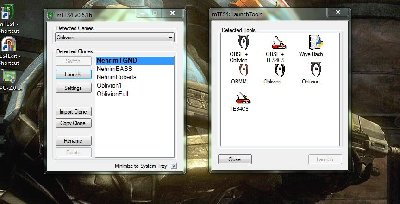
Just in case you were curious as to what mTes4 looks like or its capabilities.
Screen shot taken after clicking launch and option it gives.
mtes4 in action
Profile - jaime74

Profile - jaime74
Profile - TheHawk

“You have your way. I have my way. As for the right way, the correct way, and the only way, it does not exist.”
“I do not love the bright sword for it's sharpness, nor the arrow for it's swiftness, nor the warrior for his glory. I love only that which they defend” J.R.R. Tolkien quote
“I do not love the bright sword for it's sharpness, nor the arrow for it's swiftness, nor the warrior for his glory. I love only that which they defend” J.R.R. Tolkien quote
Profile - jaime74
Profile - TheHawk
“You have your way. I have my way. As for the right way, the correct way, and the only way, it does not exist.”
“I do not love the bright sword for it's sharpness, nor the arrow for it's swiftness, nor the warrior for his glory. I love only that which they defend” J.R.R. Tolkien quote
“I do not love the bright sword for it's sharpness, nor the arrow for it's swiftness, nor the warrior for his glory. I love only that which they defend” J.R.R. Tolkien quote
Profile - TheHawk
“You have your way. I have my way. As for the right way, the correct way, and the only way, it does not exist.”
“I do not love the bright sword for it's sharpness, nor the arrow for it's swiftness, nor the warrior for his glory. I love only that which they defend” J.R.R. Tolkien quote
“I do not love the bright sword for it's sharpness, nor the arrow for it's swiftness, nor the warrior for his glory. I love only that which they defend” J.R.R. Tolkien quote
Profile - ajs

Profile - TheHawk
“You have your way. I have my way. As for the right way, the correct way, and the only way, it does not exist.”
“I do not love the bright sword for it's sharpness, nor the arrow for it's swiftness, nor the warrior for his glory. I love only that which they defend” J.R.R. Tolkien quote
“I do not love the bright sword for it's sharpness, nor the arrow for it's swiftness, nor the warrior for his glory. I love only that which they defend” J.R.R. Tolkien quote
Profile - jaime74
Profile - ajs
Profile - TheHawk
“You have your way. I have my way. As for the right way, the correct way, and the only way, it does not exist.”
“I do not love the bright sword for it's sharpness, nor the arrow for it's swiftness, nor the warrior for his glory. I love only that which they defend” J.R.R. Tolkien quote
“I do not love the bright sword for it's sharpness, nor the arrow for it's swiftness, nor the warrior for his glory. I love only that which they defend” J.R.R. Tolkien quote