

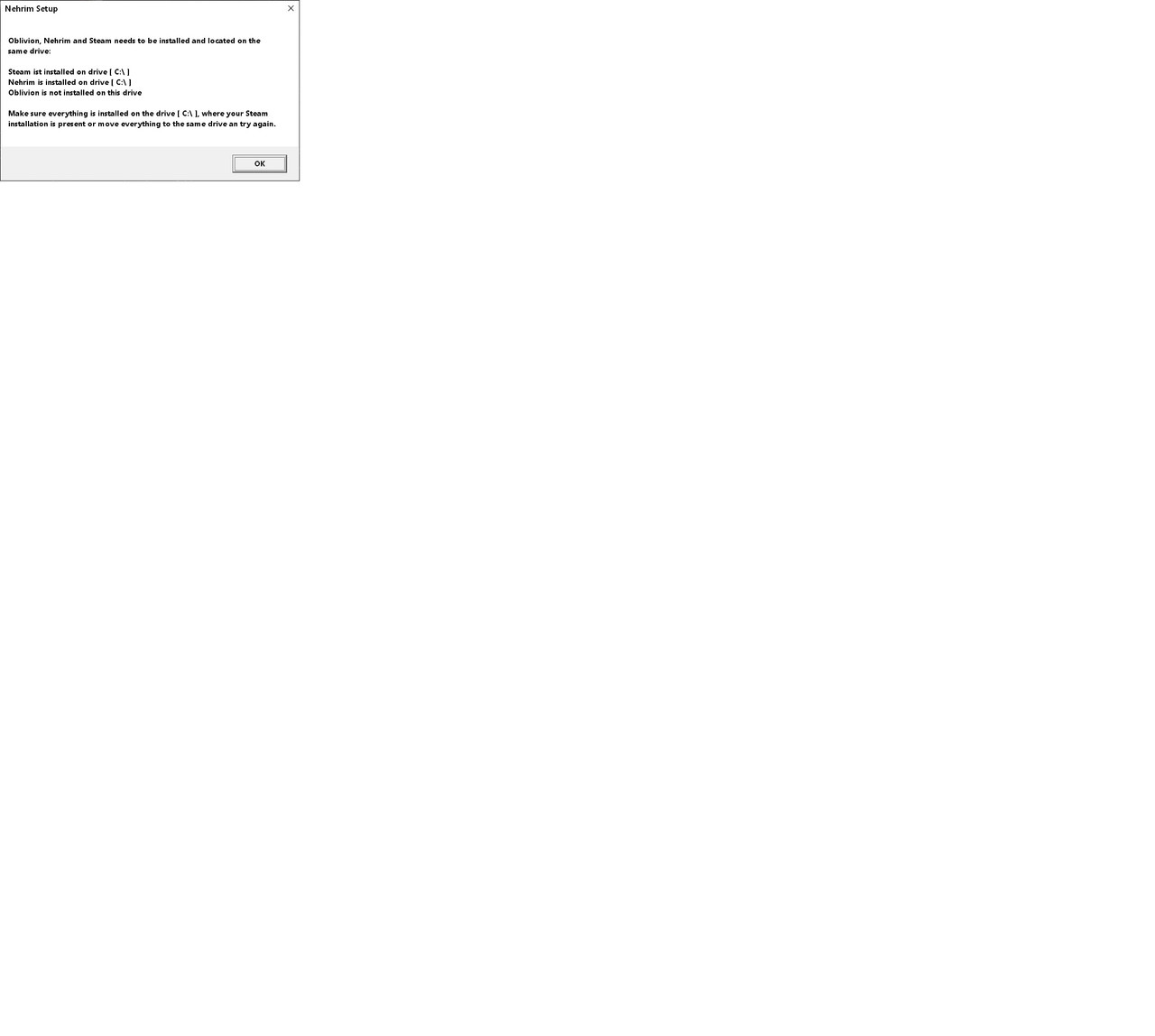
Decided to play Nehrim again. Reinstalled the game, reinstalled Oblivion from the original CD. Both are on the C drive with Steam. I showed Steam the Oblivion install so it appears in my library list, and actually started an Oblivion game just to make sure it worked. When I start Nehrim from the Steam library listing it shows me 2 launch options: "Play Nehrim: At Fates Edge, or "Launch Nehrim <> Oblivion". I chose the first option and got this error message: [img]https://i.postimg.cc/85LQLxmh/Nehrim-Error.jpg/[img] . In case this image link doesn't work, it is a Nehrim Setup error, and it's saying that it can't find Oblivion on the C drive. It sees Nehrim and Steam on C, but not Oblivion.
I also tried the second launch option but got the same error. Have verified that Oblivion.exe got copied into the Nehrim folder during install. Tried opening the Nehrim Launcher manually and starting from there, but that didn't work either. When I look at the data files while in the launcher, it lists only Nehrim.esm and Translation.esp. Is that correct? Shouldn't there be a Nehrim.esp in there as well? Thinking that Nehrim needed to be installed after Oblivion, i uninstalled and reinstalled Nehrim twice. Still no luck.
Oblivion installed itself in the following directory: C: Program Files (X86)/Bethesda Softworks/Oblivion
Nehrim installed itself in C: Program Files/Steam/steamapps/common/Nehrim
Inside the Nehrim folder is a NehrimFiles folder which holds Oblivion.exe, OblivionLauncher.exe and a bunch of other Oblivion files that appear to have been copied over during the Nehrim install.
I'm out of ideas. Any help would ne appreciated.
I also tried the second launch option but got the same error. Have verified that Oblivion.exe got copied into the Nehrim folder during install. Tried opening the Nehrim Launcher manually and starting from there, but that didn't work either. When I look at the data files while in the launcher, it lists only Nehrim.esm and Translation.esp. Is that correct? Shouldn't there be a Nehrim.esp in there as well? Thinking that Nehrim needed to be installed after Oblivion, i uninstalled and reinstalled Nehrim twice. Still no luck.
Oblivion installed itself in the following directory: C: Program Files (X86)/Bethesda Softworks/Oblivion
Nehrim installed itself in C: Program Files/Steam/steamapps/common/Nehrim
Inside the Nehrim folder is a NehrimFiles folder which holds Oblivion.exe, OblivionLauncher.exe and a bunch of other Oblivion files that appear to have been copied over during the Nehrim install.
I'm out of ideas. Any help would ne appreciated.
Oblivion and Nehrim must come from the same source and be saved in the same location
This means that you either install the old Oblivion DVD and use the Nehrim version from our website, which modifies Oblivion or a copy of it
OR
you make on C:\... a clean install Oblivion via Steam (so you must own it there, !not the remaster-version!) and then a fresh install Nehrim via Steam as well
- the Steam version includes a built-in switch so you can toggle between Oblivion and Nehrim,
(keep in mind that whenever you make changes to the installation, you must always switch to Oblivion first; otherwise, you will corrupt the installation of both games)
The Steam version includes the latest patches and a few additional small mods.
Alternatively, you can use the Nehrim-GOG version
Here, too, you must own Oblivion on GOG,
however, there is no toggle; instead, they are completely separate installs
It's the same version as the one for Steam.
This means that you either install the old Oblivion DVD and use the Nehrim version from our website, which modifies Oblivion or a copy of it
OR
you make on C:\... a clean install Oblivion via Steam (so you must own it there, !not the remaster-version!) and then a fresh install Nehrim via Steam as well
- the Steam version includes a built-in switch so you can toggle between Oblivion and Nehrim,
(keep in mind that whenever you make changes to the installation, you must always switch to Oblivion first; otherwise, you will corrupt the installation of both games)
The Steam version includes the latest patches and a few additional small mods.
Alternatively, you can use the Nehrim-GOG version
Here, too, you must own Oblivion on GOG,
however, there is no toggle; instead, they are completely separate installs
It's the same version as the one for Steam.
Thanks for the help, Stefanie. I do have the original non Steam Oblivion DVD, which is what I installed. And since I played Nehrim in 2016, I assume I used the non Steam version of that as well, so that's what I need now.
I clicked on the "Nehrim version from our website" link you provided, and it brought me to a download page that only offered the Steam or GOG version. Is there another link to the non Steam version that I am not seeing?
I clicked on the "Nehrim version from our website" link you provided, and it brought me to a download page that only offered the Steam or GOG version. Is there another link to the non Steam version that I am not seeing?
this is the correkt old download-link, from http://dl1.sureai.net ..., that's further down the page
See also the image below, where I have hokeded the 2 relevant
See also the image below, where I have hokeded the 2 relevant
Attachments
nehrim on sureai.PNG (8.71 KiB) Viewed 18274 times
Profile - rjdriver

Profile - Stefanie

Archäologin und Mumiensammlerin? ja  , alte Spiele grabe ich gerne wieder aus. Zumindest die, die es Wert sind, nicht vergessen zu werden.
, alte Spiele grabe ich gerne wieder aus. Zumindest die, die es Wert sind, nicht vergessen zu werden.Enderal-Support: Bitte lese zuerst (DE) , please read first (EN)
Profile - rjdriver
Profile - Stefanie
Archäologin und Mumiensammlerin? ja , alte Spiele grabe ich gerne wieder aus. Zumindest die, die es Wert sind, nicht vergessen zu werden.
, alte Spiele grabe ich gerne wieder aus. Zumindest die, die es Wert sind, nicht vergessen zu werden.Enderal-Support: Bitte lese zuerst (DE) , please read first (EN)