SureAI
Forums covering SureAI game titles.
Topic title - Help with lighting please
https://forum.sureai.net/viewtopic.php?t=14424
Page 1 of 1
Help with lighting please - by WIllowwombat
Posted: 07.08.2020 03:13
Last time I played Enderal the lighting wasn't a big deal but on my new computer it's a disaster. At night I can't see anything at all.
I know there are tweaks but I have no idea how to use those tweaks or where I would even find those things on my computer or in the game.
Any help would be appreciated. As It is I can't really play.
Just to be a bit more clear: I've seen all sorts of things suggested but the terms themselves don't mean anything to me so I can't follow the instructions.
One tweak I saw was to modify the Environment script for interior day and night, but unfortunately the instruction began with the instruction to hit Shift plus Enter, and on my computer that didn't open up the window that is supposed to open. In fact hitting SHift plus Enter did absolutely nothing at all.
I know there are tweaks but I have no idea how to use those tweaks or where I would even find those things on my computer or in the game.
Any help would be appreciated. As It is I can't really play.
Just to be a bit more clear: I've seen all sorts of things suggested but the terms themselves don't mean anything to me so I can't follow the instructions.
One tweak I saw was to modify the Environment script for interior day and night, but unfortunately the instruction began with the instruction to hit Shift plus Enter, and on my computer that didn't open up the window that is supposed to open. In fact hitting SHift plus Enter did absolutely nothing at all.
Re: Help with lighting please - by Stefanie
Posted: 07.08.2020 13:27
The easiest way for you is to adjust the brightness ingame, but only if you set "real fullscreen" before.
Under settings, "fullscreen" mode, not the frameless versions.
Disadvantage: using Alt_Tab, i.e. switching to another application, is more likely to crash.
Of course you can also adjust your monitor directly brighter/darker.
Other options to adjust the brightness ingame are usually more complicated and not recommended.
Under settings, "fullscreen" mode, not the frameless versions.
Disadvantage: using Alt_Tab, i.e. switching to another application, is more likely to crash.
Of course you can also adjust your monitor directly brighter/darker.
Other options to adjust the brightness ingame are usually more complicated and not recommended.
Re: Help with lighting please - by Screwball
Posted: 13.08.2020 11:07
If you have an nVidia graphics card you could try this:-
Start > Control Panel > nVidia Control Panel (or right-click the desktop > nVidia Control Panel). See the image below for the settings you need to change.
*** This will NOT work on Fullscreen Exclusive *** (it does, however, work on a Fullscreen borderless window). Neither, sadly, will it affect screenshots, in-game or otherwise.
To turn it on and off just toggle the radio button between "Other applications control colour settings" and "Use NVIDIA settings".
Leave the nVidia control panel running so you can Alt-tab to it to switch between the modes as necessary otherwise your normal windows will be excessively bright.
It should work for most places in Endarel, but there are some (especially at night) when you might need to turn your monitor up AS WELL!!
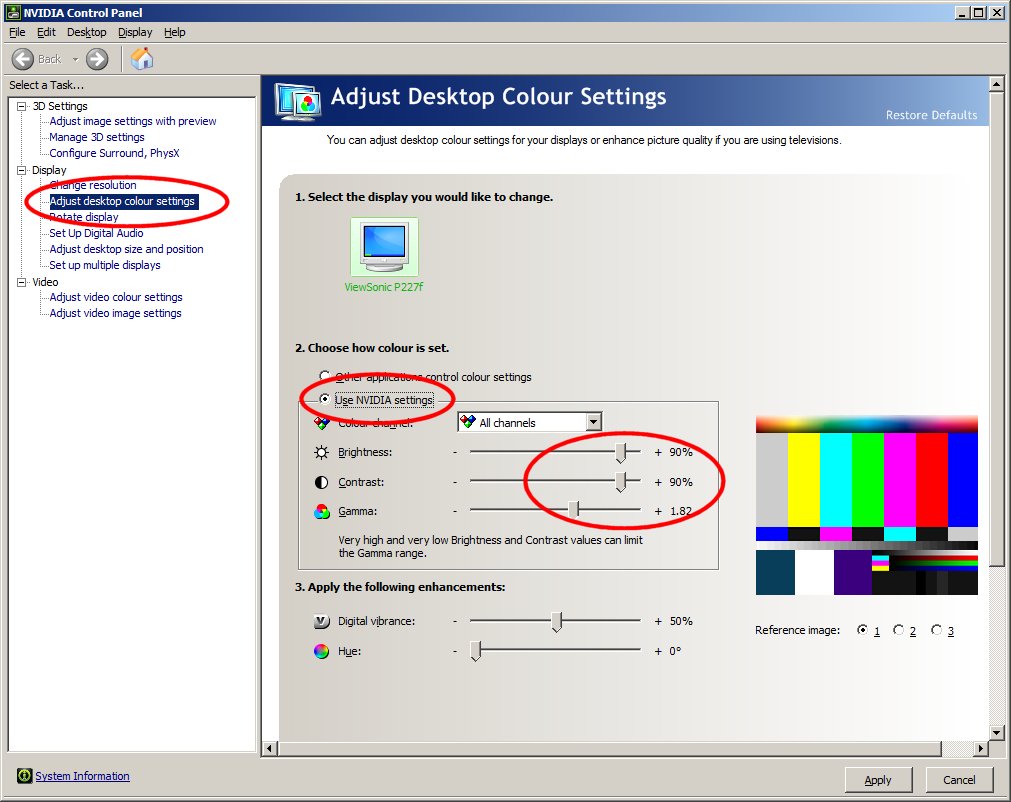
Start > Control Panel > nVidia Control Panel (or right-click the desktop > nVidia Control Panel). See the image below for the settings you need to change.
*** This will NOT work on Fullscreen Exclusive *** (it does, however, work on a Fullscreen borderless window). Neither, sadly, will it affect screenshots, in-game or otherwise.
To turn it on and off just toggle the radio button between "Other applications control colour settings" and "Use NVIDIA settings".
Leave the nVidia control panel running so you can Alt-tab to it to switch between the modes as necessary otherwise your normal windows will be excessively bright.
It should work for most places in Endarel, but there are some (especially at night) when you might need to turn your monitor up AS WELL!!
All times are UTC+02:00
Page 1 of 1
Page 1 of 1
Powered by phpBB® Forum Software © phpBB Limited