SureAI
Forums covering SureAI game titles.
Topic title - CK suddenly stopped working with Enderal [solved]
https://forum.sureai.net/viewtopic.php?t=12467
Page 1 of 1
CK suddenly stopped working with Enderal [solved] - by Celestia212
Posted: 24.06.2017 10:30
I was able to successfully mod Enderal since the German Version. CK usually gave me a lot of errors and crushed a lot but eventually I could open/create/continue to work with esp in CK and even compile scripts. My mods were stable and played well in the game.
Then CK suddenly has stopped working. I wasn't able to open even Enderal's Skyrim.esm and Update.esm - CK crushed every single time.
I completely reinstalled Enderal (latest version), and CK started working again. I've made one working esp and the next day CK has stopped working. It crushes every time I try to load an esp. I verified CK integrity, and made all necessary changes to SkyrimEditor.ini.
Why is it keep happening? How to fix it? I can't reinstall Enderal from scratch every time I want to work with CK.
Any advice would be greatly appreciated.
P.S. I do not use any mod organizers for Enderal, my antivirus seems to have no effect on CK or Enderal - played with it enabled and disabled, same goes for Steam online or offline. I also have tried to delete ClientRegistry.blob and restart Steam - no effect on CK - still get a crush after 98% loading resources in CK.
Then CK suddenly has stopped working. I wasn't able to open even Enderal's Skyrim.esm and Update.esm - CK crushed every single time.
I completely reinstalled Enderal (latest version), and CK started working again. I've made one working esp and the next day CK has stopped working. It crushes every time I try to load an esp. I verified CK integrity, and made all necessary changes to SkyrimEditor.ini.
Why is it keep happening? How to fix it? I can't reinstall Enderal from scratch every time I want to work with CK.
Any advice would be greatly appreciated.
P.S. I do not use any mod organizers for Enderal, my antivirus seems to have no effect on CK or Enderal - played with it enabled and disabled, same goes for Steam online or offline. I also have tried to delete ClientRegistry.blob and restart Steam - no effect on CK - still get a crush after 98% loading resources in CK.
Re: CK suddenly stopped working with Enderal. - by urst
Posted: 24.06.2017 14:19
welcome to the forum 
the only thing I could guess is taking a look in the SkyrimEditor.ini file
located in ...Steam\SteamApps\common\Skyrim
are the Enderal masterfiles listed under [Archives]?
yours would be different if you use the english version.
(and to block the initial warning messages (, which are completely normal for CK),
you can change
bBlockMessageBoxes=0
to
bBlockMessageBoxes=1
under [Messages] in the same file )
(also, if that initial crashing happend to be every 15 minutes, add
bEnableAudio=0
under [Audio]
(or change the 1 to 0 ) )
the only thing I could guess is taking a look in the SkyrimEditor.ini file
located in ...Steam\SteamApps\common\Skyrim
are the Enderal masterfiles listed under [Archives]?
yours would be different if you use the english version.
(and to block the initial warning messages (, which are completely normal for CK),
you can change
bBlockMessageBoxes=0
to
bBlockMessageBoxes=1
under [Messages] in the same file
)(also, if that initial crashing happend to be every 15 minutes, add
bEnableAudio=0
under [Audio]
(or change the 1 to 0 ) )
Re: CK suddenly stopped working with Enderal. - by Celestia212
Posted: 24.06.2017 16:07
I'll try audio thingy but I kind of need voice files. Will it affect voices? Anyway, I'll try. Thank you for suggestion!
All other things in SkyrimEditor.ini are fine since I was able to make mods for Enderal before and compile scripts for my mods and all my mods worked as intended for my first and second complete playthrough of Enderal and for quite a lot people that downloaded my mods from Nexus.
It even worked two days ago just fine.
Then CK has stopped working for no apparent reason.
All other things in SkyrimEditor.ini are fine since I was able to make mods for Enderal before and compile scripts for my mods and all my mods worked as intended for my first and second complete playthrough of Enderal and for quite a lot people that downloaded my mods from Nexus.
It even worked two days ago just fine.
Then CK has stopped working for no apparent reason.
Re: CK suddenly stopped working with Enderal. - by urst
Posted: 24.06.2017 16:19
the audio tweak should mute the sound, not affect the files itself;
I never needed that, if you work with voices that might be a problem :/
the outright stopping now...
sorry, no idea
no experience with the CK and it's oddities
(will try to find something though...)
I never needed that, if you work with voices that might be a problem :/
the outright stopping now...
sorry, no idea
no experience with the CK and it's oddities
(will try to find something though...)
Re: CK suddenly stopped working with Enderal. - by Celestia212
Posted: 24.06.2017 16:24
Nope. Setting bEnableAudio=0 didn't work. CK crashed again. It even can't load Enderal's Skyrim.esm. The game plays normally though, I rarely get any CTDs.
The problem is somewhere between CK and Steam I guess, I just don't know what might cause it.
I've read everything I could find by googling but still couldn't solve it.
The problem is somewhere between CK and Steam I guess, I just don't know what might cause it.
I've read everything I could find by googling but still couldn't solve it.
Re: CK suddenly stopped working with Enderal. - by Celestia212
Posted: 25.06.2017 17:42
Well, after I completely reinstalled Skyrim and Enderal my CK is working again - all my Enderal mods are loading. Really hope that it will last this time.
I've put Steam in offline mode for the time being just in case.
Still have no idea what was wrong with CK.
I've put Steam in offline mode for the time being just in case.
Still have no idea what was wrong with CK.
Re: CK suddenly stopped working with Enderal. - by Celestia212
Posted: 25.06.2017 18:57
And that bloody thing has stopped working again!
So CK basically opens 3 esp in a row and then BAM! nothing is working again. WHY!?
Steam is offline.
The only thing I did - played the game and tried to open an esp in TES5edit.
The game plays just fine so all games files are not corrupted.
TES5Edit didn't work (said something about "couldn't find ini, happens because of Steam updates" - usual stuff for a fresh Skyrim install. Before that thing with CK, TES5Edit worked and I could switch working in CK and TES5Edit with no problem.
Please help!!!
I've just spent all weekend reinstalling Skyrim and Enderal to fix CK and it worked for less than an hour.
So CK basically opens 3 esp in a row and then BAM! nothing is working again. WHY!?
Steam is offline.
The only thing I did - played the game and tried to open an esp in TES5edit.
The game plays just fine so all games files are not corrupted.
TES5Edit didn't work (said something about "couldn't find ini, happens because of Steam updates" - usual stuff for a fresh Skyrim install. Before that thing with CK, TES5Edit worked and I could switch working in CK and TES5Edit with no problem.
Please help!!!
I've just spent all weekend reinstalling Skyrim and Enderal to fix CK and it worked for less than an hour.
Re: CK suddenly stopped working with Enderal. - by urst
Posted: 25.06.2017 19:52
and it crashes completely, without any error message?
you could take a look into Windows' event log (I can only give you german translations - actual words can be different):
(right after the next crash)
- search via taskbar for "event viewer"
- in that screen, open "custom views" and then something like "administrative events"
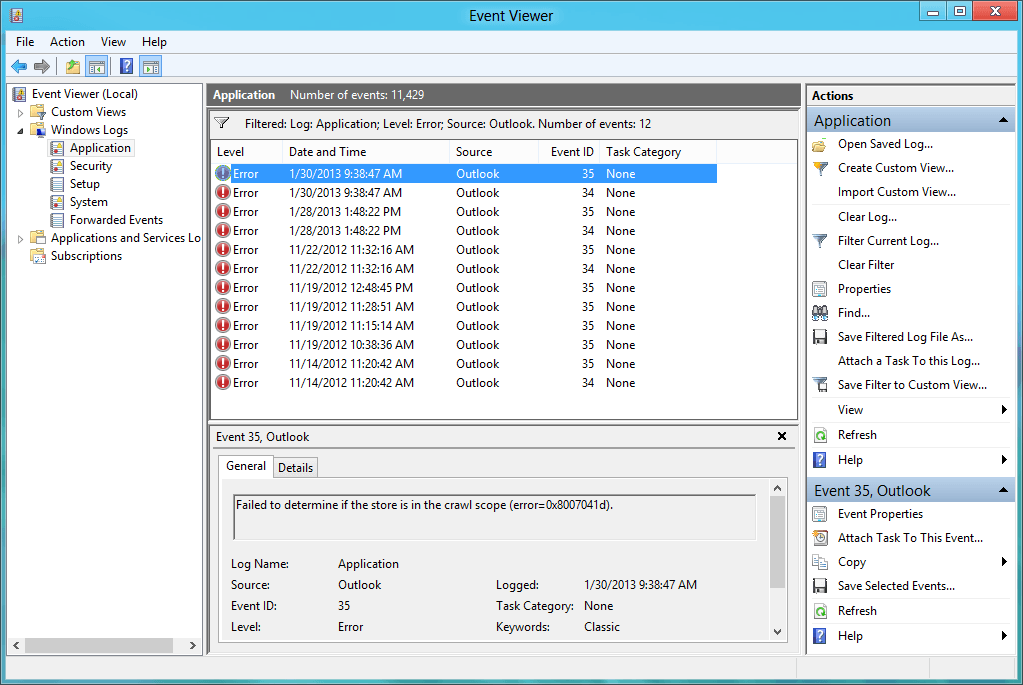
- is there anything of interest in that list on the right
Re: CK suddenly stopped working with Enderal. - by Celestia212
Posted: 26.06.2017 05:56
Thank you for trying to help me!
I'm out of my wits!
When CK crashes it shows a standard message every time. Application Error.
This what I found in event viewer - pretty much the same information:
Faulting application name: CreationKit.exe, version: 1.9.36.0, time stamp: 0x5522d2ae
Faulting module name: CreationKit.exe, version: 1.9.36.0, time stamp: 0x5522d2ae
Exception code: 0xc0000005
Fault offset: 0x0053ff4d
Faulting process id: 0x598
Faulting application start time: 0x01d2ee2ae4afddd6
Faulting application path: H:\Steam\steamapps\common\Skyrim\CreationKit.exe
Faulting module path: H:\Steam\steamapps\common\Skyrim\CreationKit.exe
The message is the same I get when modding Skyrim and sometimes CK crashes. Pretty rare event in modding Skyrim though.
And for some reason it's like 8/10 times when I was making mod for Enderal and was successful.
CK rarely crashes when working on a mod, 99% of crashes are happening on loading esp or even only esm.
Any ideas why CK is working normally for a short period of time and then suddenly stops loading at all?
I'm out of my wits!
When CK crashes it shows a standard message every time. Application Error.
This what I found in event viewer - pretty much the same information:
Faulting application name: CreationKit.exe, version: 1.9.36.0, time stamp: 0x5522d2ae
Faulting module name: CreationKit.exe, version: 1.9.36.0, time stamp: 0x5522d2ae
Exception code: 0xc0000005
Fault offset: 0x0053ff4d
Faulting process id: 0x598
Faulting application start time: 0x01d2ee2ae4afddd6
Faulting application path: H:\Steam\steamapps\common\Skyrim\CreationKit.exe
Faulting module path: H:\Steam\steamapps\common\Skyrim\CreationKit.exe
The message is the same I get when modding Skyrim and sometimes CK crashes. Pretty rare event in modding Skyrim though.
And for some reason it's like 8/10 times when I was making mod for Enderal and was successful.
CK rarely crashes when working on a mod, 99% of crashes are happening on loading esp or even only esm.
Any ideas why CK is working normally for a short period of time and then suddenly stops loading at all?
Re: CK suddenly stopped working with Enderal. - by urst
Posted: 26.06.2017 07:52
I don't have any ideas at all, I'm just guessing
- the CK works (after reinstalling) for one session or for several hours (with launching/closing)?
I'm still suspicious of the inis.
not sure how the CK handles those.
- either move skyrimeditor.ini and skyrimeditorprefs.ini (...\Steam\SteamApps\common\Skyrim)
somewher else and let the CK create new ones OR
- reinstall the CK through Steam (that should be possible? one can install it, right?)
either way, if that worked, set the new inis to "read only"
or maybe try launching the CK (from that folder) as Administrator
- the CK works (after reinstalling) for one session or for several hours (with launching/closing)?
I'm still suspicious of the inis.
not sure how the CK handles those.
- either move skyrimeditor.ini and skyrimeditorprefs.ini (...\Steam\SteamApps\common\Skyrim)
somewher else and let the CK create new ones OR
- reinstall the CK through Steam (that should be possible? one can install it, right?)
either way, if that worked, set the new inis to "read only"
or maybe try launching the CK (from that folder) as Administrator
Re: CK suddenly stopped working with Enderal. - by Celestia212
Posted: 26.06.2017 08:40
Yeah, I did it like thousand times before - didn't work.
Anyway, I think I found a culprit although it's still a mystery.
I totally disabled Meshes folder and CK was working again!
My Meshes folder is more than 1Gb so it's not possible to check all meshes.
I backtracked my steps and found that the problem is furniture/noble folder. I made a full replacer for noble furniture in Enderal so it looked as less Skyrim as possible, and in game it worked fine for quite a long time.
What is interesting, that I checked and re-checked EVERY mesh by opening it in CK (right mouse click) and ALL of them are opening normally.
When I disable the whole folder with furniture - CK is working again! If I enable furniture folder - CK crashes.
So CK is able to load all my meshes separately but for some reason it doesn't like the folder with all those meshes and crashes on loading it. Mystery.
Oh, well, I can live with that.
Will disable a furniture folder while modding in CK and enable it for playing.
Just so glad I finally was able to solve the problem! Hope it will be the end of my battle with CK and I'll be able to make mods for Enderal again!
Anyway, I think I found a culprit although it's still a mystery.
I totally disabled Meshes folder and CK was working again!
My Meshes folder is more than 1Gb so it's not possible to check all meshes.
I backtracked my steps and found that the problem is furniture/noble folder. I made a full replacer for noble furniture in Enderal so it looked as less Skyrim as possible, and in game it worked fine for quite a long time.
What is interesting, that I checked and re-checked EVERY mesh by opening it in CK (right mouse click) and ALL of them are opening normally.
When I disable the whole folder with furniture - CK is working again! If I enable furniture folder - CK crashes.
So CK is able to load all my meshes separately but for some reason it doesn't like the folder with all those meshes and crashes on loading it. Mystery.
Oh, well, I can live with that.
Will disable a furniture folder while modding in CK and enable it for playing.
Just so glad I finally was able to solve the problem!
Hope it will be the end of my battle with CK and I'll be able to make mods for Enderal again!
Re: CK suddenly stopped working with Enderal. - by urst
Posted: 26.06.2017 08:43
awesome 
to much to load at once
(the CK and it's mysteries )
)
to much to load at once
(the CK and it's mysteries
)
Re: CK suddenly stopped working with Enderal. - by Celestia212
Posted: 26.06.2017 11:41
I don't think it too much for CK. CK loads tons of everything else just fine. But if I try to load only this folder, only this one even without anything else - it crashes.
You know what is even more weird? If I put in this furniture/noble folder VANILLA meshes that use VANILLA textures - CK crashes.
By the way, CK is still working. Updated 3 mods already.
You know what is even more weird? If I put in this furniture/noble folder VANILLA meshes that use VANILLA textures - CK crashes.
By the way, CK is still working.
Updated 3 mods already.
Re: CK suddenly stopped working with Enderal. - by urst
Posted: 26.06.2017 12:15
really odd :/
but I'm glad it works now
but I'm glad it works now
All times are UTC+01:00
Page 1 of 1
Page 1 of 1
Powered by phpBB® Forum Software © phpBB Limited